
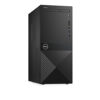

Dell Vostro Desktop Tower 3671
Applications
-
Office Productivity: Word, Excel, PowerPoint, and email management.
-
Web & Cloud Use: Browsing, Google Workspace, Microsoft 365.
-
File Storage: Local and shared file organization with HDD/SSD.
-
Business Software: Accounting, invoicing, and POS systems.
-
Communication: Video calls via Zoom, Teams, Google Meet.
-
Creative Tasks: Basic photo editing, design, and light video work.
-
Development: Coding, IDEs, and local database management.
-
Entertainment: Video/music streaming and casual gaming.
-
Peripheral Use: Printing, scanning, and multi-monitor setups.
Dell Vostro 3671 XVDX7 Mid-Tower Desktop Computer – 9th Gen Intel Core i5-9400 – 2.9 GHz – 8 GB RAM – 256 GB SSD – NVMe PCIe – Intel UHD Graphics 630 – Wi-Fi – Bluetooth – Keyboard
Description
Dell Vostro Desktop Tower 3671 – A compact mini‑tower business desktop with 9th‑gen Intel Core processors, support for up to 32 GB DDR4 RAM, and flexible storage options (SSD/HDD). It’s designed for everyday productivity, office tasks and multitasking, and often ships with Windows (e.g., Windows 10 Pro) and essential connectivity (USB, HDMI/VGA, Ethernet, Wi‑Fi) in a reliable, expandable chassis.
Specifications (General)
-
Form factor: Mini‑tower desktop PC
-
Processor options: Up to 9th Gen Intel® Core™ i3 / i5 / i7 (e.g., i5‑9400, 6‑core with Turbo up to 4.1 GHz)
-
Chipset: Intel B365/H365
-
Memory (RAM):
-
Installed: typically, 4 GB or 8 GB DDR4
-
Maximum: up to 32 GB DDR4
-
-
Storage options:
-
SATA HDD (e.g., 1 TB) or SSD (e.g., 256 GB M.2 PCIe)
-
-
Graphics: Integrated Intel UHD Graphics 630
-
Operating System: Windows 10 Pro (varies by model) or DOS/FreeDOS
Ports & Expansion
-
USB: Multiple USB‑A ports (e.g., USB 3.0 and USB 2.0)
-
Display outputs: HDMI and VGA
-
Audio: Line‑in/line‑out, headphone/microphone jacks
-
Network: Gigabit Ethernet + Wi‑Fi 802.11n + Bluetooth
-
Expansion slots: PCIe x16 and PCIe x1 slots
-
Optical drive: DVD‑RW (in many versions)
Physical & Power
-
Dimensions: ~160 mm (W) × 289 mm (D) × 373.7 mm (H)
-
Weight: ~5.9 kg
-
Power supply: ~290 W PSU
Key Features
Powerful Performance
-
Up to 9th Gen Intel® Core™ processors deliver solid computing power for everyday work and productivity tasks. Whether you’re opening multiple apps, editing documents, or running business software, these CPUs help keep things responsive and efficient. The 6‑core models boost multitasking and speed.
Enhanced Multitasking & Graphics
-
Optional discrete graphics (up to NVIDIA GTX 1050 Ti) mean you can get better visual performance than basic integrated graphics — useful for sharper visuals in presentations, light video work, and even casual gaming or design tasks.
Flexible Storage Options
-
You can configure the system with large HDDs (e.g., 1–2 TB) for storing lots of files, or fast SSDs (up to 512 GB or more) for quicker boot times and faster loading of apps. Dual‑drive setups let you combine both speed and capacity.
Business‑Grade Security
-
Hardware TPM 2.0 makes sure sensitive information like encryption keys stay protected at the hardware level.
-
BitLocker support helps prevent unauthorized access by encrypting your data and requiring a PIN or password to unlock it — giving peace of mind for business use.
Space‑Saving & Practical Design
-
The compact mini‑tower form factor doesn’t take up much desk space, while still providing room for adding more memory or storage later. Its design includes vents that help keep the system cool and reduce dust buildup.
Easy Connectivity
-
A range of USB ports (USB 2.0 & USB 3.0), HDMI, VGA, Ethernet, audio jacks, and media card readers make it simple to connect external drives, monitors, keyboards, printers and other peripherals without extra adapters.
Dell Mobile Connect Integration
-
With Dell Mobile Connect (optional), you can link your smartphone to the desktop — letting you make calls, send texts, view notifications, and transfer files directly between devices seamlessly and securely.
Built for Business Reliability
-
Ships often with Windows 10 Pro (or Windows 11 in some markets), which includes business features like remote access, virtualization support, and enhanced security — especially useful in office or enterprise environments.
Expandability
-
Inside the tower you’ll find multiple expansion slots (PCIe x16 and PCIe x1) and extra drive bays — so you can upgrade components like adding more RAM, additional drives or even discrete graphics as your needs grow.
Applications
Productivity & Office Work
-
Word processing, spreadsheets, presentations — ideal for apps like Microsoft Word, Excel, and PowerPoint for everyday office tasks.
-
Email & calendar management — smooth handling of Outlook, Gmail in browsers, and other communication tools.
Web & Online Tasks
-
Web browsing — fast access to multiple tabs for research, cloud apps, social media, and streaming.
-
Cloud‑based tools — runs Google Workspace, Microsoft 365, and other SaaS platforms efficiently.
File Storage & Management
-
Organizing files and backups — use large HDD or SSD space for documents, media, and business records.
-
Local file serving — can act as a simple shared storage point in small office environments.
Business Software
-
Accounting & invoicing — supports QuickBooks, Sage, Tally, and other business management tools.
-
Point of Sale (POS) setups — capable of driving front‑desk POS software with peripherals.
Communication & Collaboration
-
Video conferencing — works well with Zoom, Microsoft Teams, Google Meet for virtual meetings (with webcam).
-
Team collaboration platforms — Slack, Trello, Asana run smoothly for project coordination.
Visual & Creative Work (Entry‑Level)
-
Photo editing & design — handles Photoshop, GIMP, and similar programs for basic to moderate editing.
-
Content creation — suitable for simple video editing and design projects.
Development & Technical Work
-
Coding & software development — supports IDEs like VS Code, Eclipse, and builds for small to medium projects.
-
Database management — can be used for local SQL servers and development databases.
Light Entertainment
-
Media playback — excellent for watching movies, streaming videos, and music.
-
Casual gaming — can run less demanding games; boosted configurations with discrete GPUs can handle more.
Peripheral‑Driven Tasks
-
Printing and scanning workflows — connects easily to printers, scanners, and multifunction devices for daily operations.
-
Multiple monitor setups — supports dual displays for expanded workspace.
Be the first to review “Dell Vostro Desktop Tower 3671”
Related products

Dell Desktops

Dell Desktops

Dell Desktops

Dell Desktops

Dell Desktops


Dell Desktops

Dell Desktops

Dell Desktops
Reviews
There are no reviews yet.