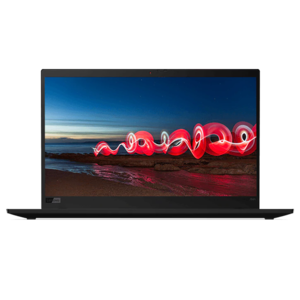
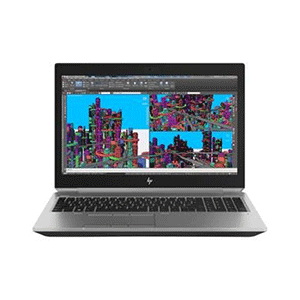
Display: 15.6″ diagonal FHD IPS eDP anti-glare LED-backlit, 220 cd/m² (1920 x 1080)
Operating System: Windows 10 Professional 64 Bit
Processor: Intel Core i7 8850H (2.6GHz, up to 4.3GHz with Intel Turbo Boost Technology, 9MB cache, 6 cores)
Memory: 16GB DDR4 2400MHz RAM (2 x 8GB). Four DIMM Slots. 64GB Max
Storage: 512GB HP Z Turbo NVMe PCIe Drive
Optical Drive: N/A
Graphics: nVidia Quadro P2000 4GB GDDR5 Dedicated Graphics
Audio: Bang & Olufsen HD audio. Integrated stereo speakers.
Interface: 3 x USB 3.0, 2 x Thunderbolt 3, RJ-45, HDMI, Headphone/Microphone combo, Card Reader
Webcam: 720p HD
Wireless: Intel 9560 802.11ac Wireless LAN + Bluetooth 5.0
Intel XMM 7360 LTE Advanced Mobile Broadband Module, Finger Print Reader
Battery: HP Long Life 6-cell, 90 Wh Li-ion polymer
Power Supply: 150 W Slim Smart external AC power adapter
Dimensions (W x D x H): 376 x 264 x 26mm
Weight: 2.6kg
| SKU | 4SQ85PA |
| Barcode # | 193015035683 |
| Brand | HP |
| Shipping Weight | 5.0000kg |
Features
1. High‑Performance Professional Processors
The ZBook 15 G5 uses 8th‑Gen Intel Core or Xeon processors (e.g., Core i7‑8750H, Xeon options). These CPUs offer high multi‑core performance and advanced instruction sets that help professional software (like CAD, modeling, and analytics tools) run smoothly. They support technologies such as Intel Turbo Boost, which increases clock speeds when needed for demanding tasks.
💡 Why it matters: Strong CPU performance provides faster calculations, real‑time processing, and quicker response times across heavy workloads — from rendering high‑resolution video to complex engineering simulations.
2. Large and Expandable Memory (RAM)
The system supports DDR4 RAM up to 64 GB (or even higher in some listings) via four SO‑DIMM slots. You can start with 8 GB or 16 GB and expand as your needs grow.
💡 Why it matters: More RAM lets your workstation handle large projects and data sets without slowing down. For example, opening massive 3D models or working with multi‑GB Excel datasets is much smoother with higher RAM.
3. Fast NVMe SSD Storage
Most configurations include PCIe NVMe SSDs (e.g., 512 GB or 1 TB). NVMe drives deliver read/write speeds far faster than traditional HDDs or SATA SSDs, which means faster boot times, quicker application launches, and near‑instant file access.
💡 Why it matters: Fast storage directly improves daily productivity — files open instantly, and large projects load without lag.
4. Professional‑Grade NVIDIA Quadro Graphics
Instead of typical gaming GPUs, the ZBook often uses NVIDIA Quadro graphics cards (e.g., Quadro P1000 or P2000). Quadro GPUs are optimized and certified for professional applications like CAD (SolidWorks, AutoCAD), 3D rendering, simulation, and video editing.
💡 Why it matters: Quadro drivers deliver greater stability and accuracy in professional apps — slow redraws, crashes, and visual glitches are reduced.
5. 15.6″ FHD (1080p) Display with Quality Visuals
Standard models offer a 15.6‑inch Full HD (1920×1080) IPS anti‑glare screen with wide viewing angles and clear color reproduction. Some configurations also offer higher brightness (e.g., 400 nits) for better outdoor visibility.
💡 Why it matters: A good display improves precision when editing visuals, reviewing CAD drawings, or working long hours without eye strain.
6. Thunderbolt 3 & Professional Connectivity
The ZBook features Thunderbolt 3 ports (40 Gb/s), USB‑A, HDMI, Ethernet, and SD card readers. Thunderbolt 3 supports fast data transfers, external GPUs, high‑res displays, and fast docking solutions.
💡 Why it matters: Versatile connectivity makes it easy to connect multiple monitors, fast storage, or specialized devices — crucial for hybrid work stations.
7. Multi‑Display Support
Without extra docks, you can drive up to four independent displays (internal panel + 3 externals). With a Thunderbolt dock, supported display count can increase further.
💡 Why it matters: Multiple monitors improve productivity for designers, analysts, and creators who need simultaneous access to various tools and windows.
8. Security & Professional Features
The ZBook includes business‑level security options such as smart card readers, TPM, fingerprint readers, and privacy camera shutters. These help protect sensitive data and support secure logins.
💡 Why it matters: Strong security is essential for corporate environments and professionals handling confidential work.
9. Durable Build & Professional Design
Built for reliability, the chassis is rugged and designed for everyday use in field or office environments. Its robust build quality withstands bumps and frequent travel.
💡 Why it matters: Durability means less worry about physical damage, important if you travel or carry the workstation frequently.
10. Battery Life & Fast Charge
Many configurations include a 90 Wh battery and support fast charging that can replenish a large portion of charge quickly.
💡 Why it matters: Long battery life helps users remain productive on the go — whether in meetings, on site, or in transit.
Applications and real‑world software use cases where the HP ZBook 15 G5 shines — explained with what each application does and why the ZBook handles it well:
1. 3D CAD & Engineering Design
Software examples: AutoCAD, SolidWorks, CATIA, Revit
What it does:
-
Designers and engineers create and modify detailed 2D/3D models of buildings, machines, vehicles, and industrial parts.
-
These models often have thousands of components — requiring precision and fast geometry calculations.
Why ZBook is ideal:
-
Professional Quadro GPU for stable 3D rendering.
-
Powerful multi‑core CPU handles complex geometry and large assemblies without lag.
-
ISV certifications ensure these apps run reliably without crashes.
2. Video Editing & Motion Graphics
Software examples: Adobe Premiere Pro, DaVinci Resolve, After Effects
What it does:
-
Editors combine footage, apply effects, correct color, and export high‑resolution videos (often up to 4K or higher).
-
Rendering these timelines involves heavy compute and GPU power.
Why ZBook is ideal:
-
Large RAM plus fast SSD reduce rendering times and help handle large video files.
-
Quadro graphics deliver consistent frame playback and accelerate export tasks.
-
Multiple USB‑C/Thunderbolt ports allow external drives and monitors for smoother workflows.
3. Simulation & Analysis
Software examples: ANSYS, MATLAB, engineering simulation tools
What it does:
-
Used for tasks like finite‑element analysis (stress tests, thermal simulations) and mathematical modelling.
-
These applications require intense computation and memory throughput.
Why ZBook is ideal:
-
Multi‑core CPUs accelerate calculations.
-
Expandable RAM (up to 64GB+) lets you work with larger datasets.
-
Professional drivers keep these systems stable during long computation runs.
4. Graphic Design & Digital Illustration
Software examples: Adobe Photoshop, Adobe Illustrator
What it does:
-
Designers edit photos, create illustrations, work with layers and effects.
-
Projects may include huge image files that stress memory and display accuracy.
Why ZBook is ideal:
-
High‑resolution display with good color accuracy shows fine detail.
-
Professional GPU and CPU combo keeps performance smooth even with many layers or large canvases.
5. Architecture & Building Information Modeling (BIM)
Software examples: Revit, ArchiCAD
What it does:
-
BIM tools integrate architectural design, structural modeling, and project documentation in one model.
-
Models may be massive (entire buildings and linked files).
Why ZBook is ideal:
-
Combination of processor power, large memory, and dedicated graphics lets you navigate and render these huge model datasets without slowdown.
6. Data Analysis & Scientific Computing
Software examples: MATLAB, Python data science libraries, R
What it does:
-
Analyze large datasets, run statistical models, or build machine‑learning workflows.
Why ZBook is ideal:
-
Ample RAM and compute power let you import, transform, and visualize data efficiently.
-
Fast NVMe SSDs reduce waiting time for large file I/O.
7. Virtual Machines & Development
Software examples: VMware, Hyper‑V, Linux/Windows development stacks
What it does:
-
Developers run multiple operating systems or containers for testing, debugging, or deployment workflows.
Why ZBook is ideal:
-
Lots of RAM and CPU threads make running multiple virtual environments responsive.
-
Robust connectivity and ports allow external debugging devices or test hardware.
8. Remote Workstations / Remote Graphics Access
Software example: HP ZCentral Remote Boost and similar solutions
What it does:
-
Lets users remotely access a workstation’s full power from any device while keeping heavy computation on the ZBook itself.
Why ZBook is ideal:
-
Built‑in support for remote graphics solutions lets professional users do intense work even when physically away from the device.
-
Useful for distributed teams working on shared projects.
Summary of Typical Application Types
| Use Type | Examples | Why ZBook Works |
|---|---|---|
| 3D CAD & Design | AutoCAD, SolidWorks | Strong GPU, large RAM |
| Video Editing | Premiere Pro, Resolve | Fast CPU/GPU acceleration |
| Simulation & Analysis | ANSYS, MATLAB | High compute power |
| Digital Design | Photoshop, Illustrator | Display & processing performance |
| Architecture (BIM) | Revit | Handles massive 3D models |
| Data Science | Python, R workflows | Big memory & storage |
| Development/VM | VMware, Linux | Multi‑tasking power |
| Remote Work | ZCentral Remote Boost | Remote access to full workstation power |


Reviews
There are no reviews yet.