
The HP ZBook 15 G4 is a 15.6‑inch professional mobile workstation laptop built for demanding tasks like 3D design, engineering, and content creation. It combines powerful Intel processors, NVIDIA Quadro professional graphics, and up to 64 GB of memory in a durable chassis with extensive connectivity — making it ideal for engineers and creative professionals who need desktop‑class performance on the go.
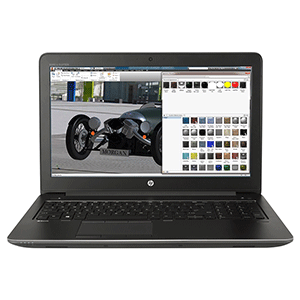
HP ZBook 15 G4
-
Type: 15.6‑inch professional mobile workstation laptop
-
Processor: Intel Core i7 or Xeon (7th Gen) for heavy multitasking and simulations
-
Memory: Up to 64 GB DDR4 RAM for large datasets and smooth multitasking
-
Graphics: NVIDIA Quadro professional GPU for CAD, 3D modeling, and media work
-
Display: Full HD or optional 4K UHD panel with anti‑glare coating
-
Storage: NVMe PCIe SSDs (fast boot and file access) with optional HDD expansion
-
Connectivity: Thunderbolt 3, USB‑A, HDMI, VGA, SD card reader, Gigabit Ethernet
-
Battery: High‑capacity (~90 Wh) with HP Fast Charge support
-
Durability: Rugged chassis built for professional, everyday use
-
Use Cases: CAD, 3D modeling, video editing, simulations, data analysis, software development
HP ZBook 15 G4 1NC90PA 15.6″ Notebook – 15.6″ 4K UHD (3840×2160) Display – Intel Core i7-7820HQ – 8GB (1x 8GB) DDR4-2400 SDRAM – 256GB HP Z Turbo Drive PCIe SSD – Nvidia Quadro M1200 4GB GDDR5 – Intel Dual Band Wireless-AC 8265 802.11 a/b/g/n/ac and Bluetooth 4.2 Combo – Win 10 Pro – 3 Year Onsite Warranty
Get the HP ZBook 15 G4 at the best price in Kenya from Sevag Limited
Description
Specifications
Processor : Intel Core i7-7820HQ with Intel HD Graphics 630 (2.9 GHz, up to 3.9 GHz with Intel Turbo Boost Technology 2.0, 8 MB L3 cache, 4 cores)
Chipset : Mobile Intel CM236 integrated with processor
Operating system : Windows 10 Pro 64
Memory, standard : 8 GB DDR4-2400 SDRAM (1 x 8 GB)
Memory slots : 4 SODIMM
Expansion slots : 1 SD UHS-II flash media; 1 smart card reader
Storage : 256 GB HP Z Turbo Drive PCIe SSD
Displays : 15.6 diagonal 4K display
Webcam : 720p HD webcam
Display and Graphics : Discrete
Ports : 1 RJ-45; 1 USB 3.0 (charging); 1 VGA; 1 power connector; 2 USB Type-C (Thunderbolt 3, DisplayPort 1.2, USB 3.1); 2 USB 3.0; 1 stereo microphone-in
headphone-out combo; 1 power connector; 2 USB Type-C (Thunderbolt 3, DisplayPort 1.2, USB 3.1); 2 USB 3.0; 1 stereo microphone-in
headphone-out combo; 1 RJ-45; 1 USB 3.0 (charging); 1 VGA
Network interface : Integrated Intel I219-LM Gigabit Network Connection
Power : 150 W Slim Smart AC adapter (external)
Keyboard : HP Spill Resistant Keyboard (backlit with function key control) with numeric keypad
Dimensions : 38.6 x 26.4 x 2.6 cm
Weight : Starting at 2.6 kg
Warranty : 3 years standard parts, labour and on-site limited warranty, depending on country (upgrades available), 1 year limited warranty on primary battery
| Brand | HP (Hewlett-Packard) |
| CPU | Intel Xeon E3 |
| RAM | 32GB |
| Operating System | Windows 10 Pro |
| Storage | 500GB – 512GB |
| Screen Size | 15″ – 15.9″ |
| Graphics Card | NVIDIA Quadro |
| Recommended For | Business |
| 2-in-1 | No |
| Touch Screen | No |
| Ultrabook | No |
| 4G Ready | Yes |
| Bluetooth | Yes |
| Optical Drive | No |
| SKU | 1NC90PA |
| Brand | HP |
| Shipping Weight | 4.5000kg |
key features of the HP ZBook 15 G4
🔹 Powerful Professional‑Grade Performance
The ZBook 15 G4 is equipped with 7th Gen Intel® Core™ i7 or Xeon® processors, which are quad‑core CPUs designed for heavy workloads like 3D rendering, simulations, data analysis, and engineering software. These chips include Intel Turbo Boost technology that increases clock speed automatically when extra performance is needed.
Why it matters: This level of processing lets you run demanding professional applications smoothly and multitask without lag.
High Memory Capacity (Up to 64 GB)
It supports up to 64 GB of DDR4 RAM, spread across multiple SO‑DIMM slots. More RAM lets your system handle large files and multiple applications simultaneously without slowing down.
Why it matters: Plenty of memory is essential for professional workflows — especially in 3D modeling, large spreadsheets, video editing, and virtual machines.
Professional Discrete Graphics (NVIDIA Quadro)
The workstation offers NVIDIA Quadro GPUs with dedicated GDDR5 memory. Quadros are built for tasks like CAD, BIM, and creative workflows, and they have certified drivers for apps such as SolidWorks, AutoCAD, and Adobe Creative Suite.
Why it matters: Unlike gaming GPUs, Quadro cards prioritize reliability, precision, and compatibility with professional software — giving better performance in creative and engineering tools.
High‑Quality Display Options
The ZBook 15 G4 comes with a 15.6‑inch screen with options including Full HD (1920×1080) and even 4K UHD (3840×2160) panels. These displays have anti‑glare coatings to reduce reflections and can show very sharp, detailed images.
Why it matters: A larger, clearer display helps with detailed design work, precise photo/video editing, and comfortable long‑term usage.
Thunderbolt™ 3 and Versatile Connectivity
It has Thunderbolt 3 ports (USB‑C) that support super‑fast data transfer (up to 40 Gb/s), video output (DisplayPort), and connection to external docks, high‑speed storage, and multiple monitors. Additionally, there are USB‑A ports, HDMI, VGA, SD card reader, and Gigabit Ethernet.
Why it matters: This lets professionals easily connect to high‑resolution displays, external drives, and network setups without adapters.
Fast and Expandable Storage
Models use NVMe PCIe SSDs (e.g., 256 GB, 512 GB, or larger) for the main drive, with additional slots available for expansion or secondary drives. Unlike traditional hard drives, SSDs have no moving parts, making them quicker and more durable.
Why it matters: Fast storage improves boot times, speeds up access to large files, and keeps workflows responsive.
Long Battery Life
The ZBook 15 G4 typically includes a high‑capacity battery (around 90 Wh) that can last a long day with light usage, and it supports HP Fast Charge for rapid recharging.
Why it matters: Better battery life reduces interruptions and helps professionals work on the go without constantly searching for a power outlet.
Business & Security Features
The system supports security tools such as TPM (for encryption), fingerprint readers, and optional smart card readers. It also includes features like HP BIOS Protection to guard against firmware attacks.
Why it matters: These help protect sensitive business data and support corporate security standards.
Durable Build & Professional Reliability
Built as a mobile workstation, the ZBook has a sturdy chassis and professional‑class components designed for long‑term reliability — ideal for studios, offices, and field work.
Why it matters: Tough construction means it withstands daily professional use better than consumer laptops.
Common applications and use‑cases for the HP ZBook 15 G4 — showing where it shines and why professionals choose it:
1. CAD & 3D Modeling Software
The ZBook 15 G4 is built to run Computer‑Aided Design (CAD) tools used by engineers, architects, and product designers. These programs create, edit, and analyze complex 2D and 3D models.
Common software:
-
AutoCAD
-
SolidWorks
-
Revit
-
CATIA
Why it’s suitable: The powerful CPU + professional NVIDIA Quadro GPU combination is optimized (ISV‑certified) for precise 3D work and large assemblies, enabling smooth real‑time model interaction and reliable performance.
2. Creative & Multimedia Applications
Content creators benefit from the ZBook’s ability to handle demanding photo, video, and motion‑graphic workloads.
Common software:
-
Adobe Photoshop (photo editing)
-
Adobe Premiere Pro / DaVinci Resolve (video editing)
-
After Effects (motion graphics)
-
Blender, Maya (3D animation/rendering)
Why it’s suitable: Fast multi‑core CPUs, dedicated GPU acceleration, and optional 4K display make it capable of editing large images, rendering timelines, and previewing 3D scenes efficiently.
3. Engineering Simulation & Analysis
Beyond modeling, many professionals run simulations — testing structural strength, fluid dynamics, or thermal properties of designs before building hardware.
Common tools:
-
ANSYS
-
Abaqus
-
MATLAB (numerical computing)
Why it’s suitable: This laptop’s high RAM capacity and strong processing handle computation‑heavy tasks and large datasets that come with simulations.
4. Scientific Computing & Data Analysis
Researchers and scientists use workstations for statistical computing, data crunching, and visualization.
Common tools:
-
MATLAB (scientific computing)
-
Python (with NumPy, SciPy, pandas)
-
R (data analysis)
-
Tableau, Power BI (data visualization)
Why it’s suitable: Plenty of RAM and fast SSD storage allow handling large datasets, while CPU power keeps analyses responsive.
5. Software Development & Virtualization
Developers can use the ZBook for compiling code, running integrated development environments (IDEs), and even hosting virtual machines for testing and development.
Common tools:
-
Visual Studio, Eclipse, JetBrains IDEs
-
Docker, VirtualBox, VMware
-
Git and other version control systems
Why it’s suitable: The high‑core CPU and up to 64 GB of RAM help in multitasking between code editors, compilers, emulators, and test environments.
6. Remote Work & Professional Collaboration
With tools like HP ZCentral Remote Boost (formerly HP RGS), you can access powerful workstations remotely while maintaining color‑accurate and responsive graphics — useful for remote engineers and creative teams.
Summary by Task Type
| Task | Examples of Software | Why ZBook 15 G4 is Right |
|---|---|---|
| CAD & 3D | AutoCAD, SolidWorks | ISV‑certified drivers for stability |
| Video & Media | Premiere Pro, Blender | GPU acceleration + large screen |
| Scientific / Data | MATLAB, R, Python | High RAM and storage performance |
| Engineering Analysis | ANSYS, Abaqus | Strong CPU + memory for simulations |
| Development / Virtualization | Docker, IDEs | Handles multi‑environment workflows |
Be the first to review “HP ZBook 15 G4”
Related products
LAPTOPS

LAPTOPS

Hp Laptops

Hp Laptops

Hp Laptops

Hp Laptops

Hp Laptops

Dell Laptops
Reviews
There are no reviews yet.