Hp Pavilion X360 14m-Dh003dx Intel Core I5-8265U 1.6GHz/8GB DDR4/128GB SSD/14″ 4K TOUCH/INTEL 620 UHD GRAPHICS/FINGERPRINT/BACKLIT/WINDOWS 10
Get the Hp Pavilion X360 14m-Dh003dx Intel Core I5 at the best price in Kenya from Sevag Limited
Description
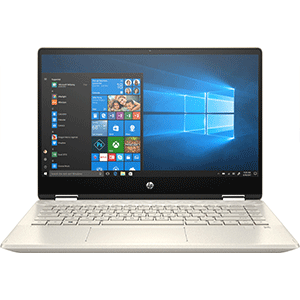
HP Pavilion x360 14m‑DH003DX is a 14‑inch 2‑in‑1 convertible touchscreen laptop powered by an Intel Core i5 processor (8th Gen) with 8 GB RAM and a 128 GB SSD. It features a Full HD touch display that can rotate 360° for use in laptop, tent, stand, or tablet mode, making it versatile for work, study, and entertainment. The laptop runs Windows and includes standard ports (USB‑C, HDMI, USB‑A), a built‑in webcam, and integrated graphics suitable for everyday tasks like browsing, office apps, and media playback.
Specifications
✅ Model: HP Pavilion x360 14m‑DH003DX
➡️ Convertible 2‑in‑1 laptop with a touchscreen that rotates 360° for use as a tablet, laptop, tent, or stand mode.
Processor
-
Intel Core i5‑8265U (8th Gen)
-
Base clock: 1.6 GHz
-
Boost clock up to 3.4 GHz with Intel Turbo Boost Technology
-
4 cores, 6 MB cache — balanced performance for daily tasks.
Memory (RAM)
-
8 GB DDR4‑2400 SDRAM (1 × 8 GB)
-
Provides smooth multitasking for web browsing, documents, and video apps.
Storage
-
128 GB PCIe NVMe M.2 SSD
-
Fast startup, quick app opening, and shorter load times compared with HDDs.
Display
-
14″ Full HD (1920 × 1080) IPS multitouch touchscreen
-
WLED‑backlit, edge‑to‑edge glass for bright and clear visuals.
Graphics
-
Intel UHD Graphics 620 (integrated)
-
Handles everyday visuals, videos, and light graphic tasks.
Wireless Connectivity
-
Wi‑Fi 802.11b/g/n/ac (Wi‑Fi 5)
-
Bluetooth 4.2 Combo for connecting phones, headsets, and other devices.
Ports & Expansion
-
1 × USB‑C 3.1 Gen1 (data)
-
2 × USB‑A 3.1 Gen1
-
1 × HDMI
-
1 × Headphone/Microphone combo jack
-
1 × Multi‑format SD media card reader
➡️ Good range of ports for accessories, external displays, and media cards.
Camera & Audio
-
HP Wide Vision HD Webcam with dual‑array microphones — for video calls.
-
Dual speakers
-
Audio tuned by B&O PLAY for better sound than typical laptop speakers.
Battery & Power
-
3‑cell, 41 Wh Li‑ion battery
-
45 W AC power adapter
➡️ Good for several hours of use on a charge (actual life varies by usage).
Input & Extras
-
Full‑size island‑style backlit keyboard — easier typing in low light.
-
HP Imagepad with multi‑touch gesture support — smooth trackpad control.
Dimensions & Weight
-
Approx. 32.35 × 22.42 × 1.97 cm
-
Weight: ~1.6 kg — portable but solid build.
Operating System
-
Windows 10 Home (typically pre‑installed)
➡️ May vary depending on seller configuration.
Features
🔁 1. 360° Convertible Design
This laptop uses a 360‑degree hinge, which lets you flip the screen all the way around so you can use it in multiple modes — laptop, tablet, tent, or stand mode.
➡️ This makes the device versatile for typing, drawing, presenting, or watching content comfortably without a separate keyboard.
2. 14‑inch Full HD Touchscreen Display
It has a 14″ Full HD (1920×1080) multitouch screen that is bright and responsive to touch input.
➡️ Full HD gives crisp, clear visuals for videos, photos, reading, and browsing, while touch support makes navigation intuitive, especially in tablet mode.
3. Intel Core i5 Processor
Powered by an Intel Core i5 processor (in recent versions 11th/12th Gen), this CPU balances performance and efficiency.
➡️ It handles everyday tasks like multitasking, document editing, web browsing, online meetings, and light media editing smoothly without lag.
4. Fast Storage (SSD)
Most Pavilion x360 models offer a PCIe NVMe SSD (e.g., 256 GB or 512 GB) instead of a traditional hard drive.
➡️ SSDs are much faster than HDDs — they help the system boot quickly, open apps faster, and reduce waiting time when accessing files.
5. Sufficient RAM for Multitasking
With 8 GB DDR4 RAM (standard in many configurations), the laptop can keep multiple applications and browser tabs active at the same time.
➡️ This ensures smooth everyday use without slowdowns during multitasking.
6. Enhanced Audio Experience
The Pavilion x360 typically includes audio tuned by Bang & Olufsen with dual speakers.
➡️ This delivers clearer, richer sound for music, videos, calls, and games compared with average laptop speakers.
7. Wireless Connectivity
It supports modern Wi‑Fi standards (Wi‑Fi 5 or Wi‑Fi 6 depending on the version) and Bluetooth.
➡️ This means faster internet speeds, more reliable connections, and smooth pairing with wireless accessories like headphones and mice.
8. Versatile Ports
Typical ports include:
-
USB‑C with power delivery and display output
-
USB‑A ports
-
HDMI for external displays
-
Headphone/mic combo
➡️ This range of ports lets you connect monitors, storage devices, projectors, and more without adapters.
9. Webcam and Microphones
Equipped with an HD webcam and integrated microphones, the laptop supports video calls and online meetings.
➡️ Great for remote work, online classes, and virtual collaboration.
10. Security Features
Many Pavilion x360 models include a fingerprint reader for secure and fast logins.
➡️ This adds an extra layer of security and convenience compared with typing a password every time.
11. Battery Life for All‑Day Use
Battery capacity usually ranges around 8–11 hours of mixed use, depending on configuration and screen brightness.
➡️ This makes it reliable for school, work, travel, or entertainment when you’re away from a power outlet.
Applications
Productivity & Office Work
-
Microsoft Office / Google Workspace: Word, Excel, PowerPoint, Sheets, Docs, Slides
✔ Great for writing documents, making spreadsheets, and preparing presentations. -
Email & Calendar: Outlook, Gmail, and scheduling apps
✔ Keeps you organized and on top of communication.
Web Browsing & Online Tasks
-
Web browsing: Chrome, Edge, Firefox
✔ Smooth performance with multiple tabs open. -
Research & Cloud tools: Google Drive, OneDrive, Dropbox
✔ Easy access to cloud files and storage.
Communication & Collaboration
-
Video conferencing: Zoom, Microsoft Teams, Google Meet
✔ HD webcam + microphone make online classes and meetings workable. -
Chat & collaboration: Slack, Discord, WhatsApp Web
✔ Good for messaging and team coordination.
Learning & E‑Education
-
E‑learning platforms: Coursera, Udemy, Khan Academy
✔ Watch lectures, download course PDF materials. -
Coding & development tools: VS Code, Jupyter, Python IDEs
✔ Suited for beginner to intermediate programming tasks.
Creativity & Design (Light)
-
Photo editing: Photoshop Elements, GIMP, Paint.NET
✔ Works well for basic editing and touch‑friendly cropping/adjustments. -
Note‑taking & sketching: OneNote, Evernote
✔ Use touchscreen and tablet mode for handwritten notes (stylus optional).
Entertainment
-
Streaming video: YouTube, Netflix, Amazon Prime Video
✔ Full HD display and decent speakers make binge‑watching enjoyable. -
Music & Podcasts: Spotify, Apple Music Web, SoundCloud
✔ Clear audio and easy playback.
File & Media Management
-
PDF readers: Adobe Acrobat, Edge Reader
✔ Opens documents for class or work. -
Media browsing: Photos, VLC Player
✔ View images and play videos smoothly.
Everyday Utilities
-
System tools: File Explorer, Task Manager, Settings
✔ Basic navigation and system management. -
Security software: Windows Defender, antivirus tools
✔ Keeps the device secure while online.
Not Ideal For
-
High‑end gaming: AAA games at high settings
✔ Integrated Intel UHD Graphics is not designed for graphically heavy games. -
Professional video editing / 3D modeling:
✔ Can handle light edits but slower on large projects.


Reviews
There are no reviews yet.